Good morning everyone. Today I won't have time to work on my goalkeeper game, because I'll be at a restaurant to have our annual Christmas dinner with work. I'll be home late. This blogpost will be the only thing I'll do for the game today.
Yesterday I had a little more time, although my favourite team had extra time in the cup, which I was not expecting. And there are farmer protests worth being annoyed about. I'm not so much into alt right climate denier stuff. Anyway, the game.
What I did yesterday was finally get Unity Remote to work on my phone. I have no idea what an SDK, NDK or JDK actually is, but it seems that I needed to click Browse Three times before Unity understood it comes with this trio. I also had to tap the build number on my phone a couple of times. But now it works.
My game is initially made as a PC game with mouse control and Esc and the pause key to access menus, so I know there need to be some changes to the game to make them playable for mobile.
First, the screen is very small, compared to the wide screen of my monitor. This means that, with a screen covering the goal, the gloves are very small and it's very difficult to stop the ball from going in. I'll make the gloves a lot bigger, probably twice as big in any dimension. That'll not take too much time and effort. The same applies to buttons and text in the menus.
Secondly, while the mouse movement is ported to swiping, which I was planning to do anyway, the gloves will be quite far to the right of the finger, making them difficult to control. I I'll find a way to control that. I guess this will be more difficult. I want the gloves to be right on top of the finger.
Thirdly, there'll be a leader board to track who is best. Games like this can get boring quickly if the core mechanics are under control. A leader board should give it little more longevity.
The work I'll be doing anyway, is the sounds. It does not matter which device is used to play the game. I need sounds. I also need some background sprite to block the view of the Unity blue void. Those will be made soon. Now of to work. Till next time!
Showing posts with label UI. Show all posts
Showing posts with label UI. Show all posts
Wednesday, 18 December 2019

Monday, 16 December 2019
It's a game now!
Good morning everyone. Here's another installment. I notice that while I'm not working on Holocene, the devlogs are further in between. I even found out that I don't have a name for my new goalkeeper game. It does not matter to me really. There may just be less to talk about this game.
Alright, over the last couple of days, what have I been up to? Well, I kind of made the game. The schedule was to have the main mechanics ready by the end of week one, which is last week. This week would be for the GUI and mechanics around new games, pauses and the like. That's what happened. Yesterday was a GUI day. I made this:

I know. It does not look like much but the different texts and buttons are part of four panels that can be turned on and off: the main menu, the pause screen, the game over screen and the game screen. These panels are shown when needed.
What else am I going to do? First, I'll study ways to build leader boards. The game will laat be ported to Android and iOS and it'll be fun to give the game done longevity by adding the competitive edge. I don't worry the game won't quit after a while, because some of the shots are difficult to stop, especially the high ones.
Next, I'm going to add sounds and probably done background drawing with fans or something else, because a penalty box does not typically float in a space that looks eerily like a Unity scene. When that's finished, the PC build is ready and focus will shift first to Android and then to iOS.
Alright, over the last couple of days, what have I been up to? Well, I kind of made the game. The schedule was to have the main mechanics ready by the end of week one, which is last week. This week would be for the GUI and mechanics around new games, pauses and the like. That's what happened. Yesterday was a GUI day. I made this:

I know. It does not look like much but the different texts and buttons are part of four panels that can be turned on and off: the main menu, the pause screen, the game over screen and the game screen. These panels are shown when needed.
What else am I going to do? First, I'll study ways to build leader boards. The game will laat be ported to Android and iOS and it'll be fun to give the game done longevity by adding the competitive edge. I don't worry the game won't quit after a while, because some of the shots are difficult to stop, especially the high ones.
Next, I'm going to add sounds and probably done background drawing with fans or something else, because a penalty box does not typically float in a space that looks eerily like a Unity scene. When that's finished, the PC build is ready and focus will shift first to Android and then to iOS.
Sunday, 15 September 2019
UI and a glass cube
So, last weekend was fun. I did not have much time for game development as we went to stay in a 3x3x3 glass cube in the woods for the night. We did. Next day was the prehistoric museum so that was fun too.
I did spend some time on the game yesterday. Still the UI. What I want to make is the panel at the bottom of the screen where information on the selected unit(s) is shown. It'll be a panel with different parts that show or don't show, depending on the type of object that is selected. There'll also be a panel with icons for actions the selected object can perform. That needs some work and that's what I am doing this week, probably.
I did spend some time on the game yesterday. Still the UI. What I want to make is the panel at the bottom of the screen where information on the selected unit(s) is shown. It'll be a panel with different parts that show or don't show, depending on the type of object that is selected. There'll also be a panel with icons for actions the selected object can perform. That needs some work and that's what I am doing this week, probably.
Tuesday, 10 September 2019
Showing information
Alright, a short one, because I don't have much time now. Yesterday and the day before, I was working on the UI gor Holocene. For now, as always, everything is placeholder, but we'll have a resource panel and a selection panel to show information on the game. The resource panel is already working. It reads all the storage objects the player has and shows totals per resource type.
The selection panel is going to be a bit more complex. I had my plan for this written out before, but it needs some finetuning because the code is a bit different. It'll be fine though, because I like what it was, so this should not take too much time. For now, the UI with the Worker unit selected, will look something like this:

Remember, placeholder is the key word here. I want it all yo work first before making it look pretty.
The selection panel is going to be a bit more complex. I had my plan for this written out before, but it needs some finetuning because the code is a bit different. It'll be fine though, because I like what it was, so this should not take too much time. For now, the UI with the Worker unit selected, will look something like this:

Saturday, 20 July 2019
The action and the goat
So, back from my two weeks holiday to Santorini with my wife and back to programming in another week of before the office seems to need me again. I made two things in Holocene work. One is a UI thing and the other is a game mechanic.
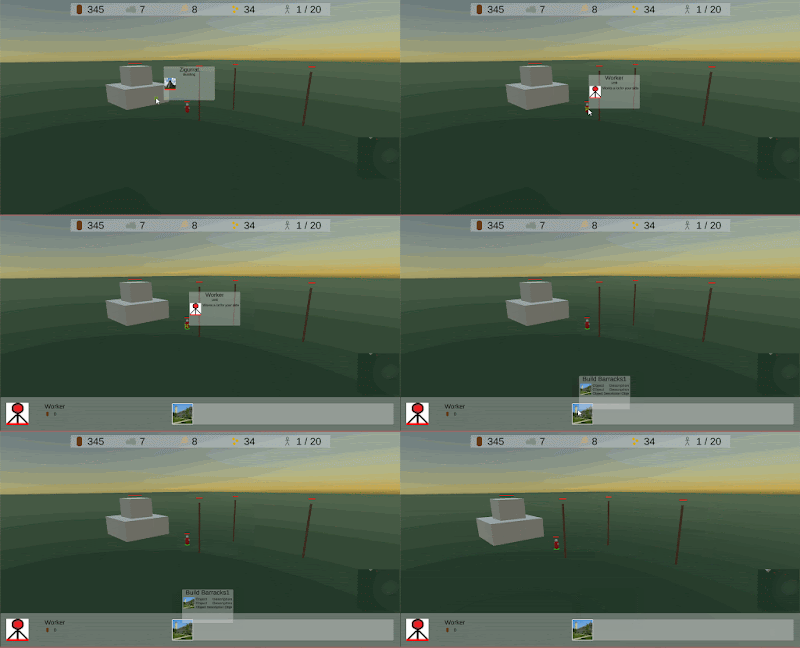
The UI thing is about getting tooltips for when the mouse cursor hovers over an object or a UI element. For now I wanted two kinds of tooltips to be possible: Object tooltips and action tooltips. Object tooltips are actually pretty straightforward and they were easy to implement. Whenever the mouse hovers over an object, I use the same system that helps me detect objects to be able to select them by clicking. That system will trigger a little GUI panel with some information about the object.
The second thing was more difficult. Actions are not physical things, just GUI elements. This means that I could not use the system I use for detecting objects. I tried to use events on the button for running the actions, but that did not work, because the buttons are rebuilt all the time, making the tooltip flash on and off, because it detects there's nothing that we point to. This took some time to fix, because I needed to work with an unfamiliar concept: a graphics raycast. How could I know that existed?
With a graphics raycast, I detect there is a couple of UI elements below the mouse pointer. In that list, I find the relevant one (a panel with action information). That element contains a script that controle the contents anyway. All I have to do is show that action on the tooltip and reset a counter. This counter is to make sure that the tooltip will only vanish when no panel has been detected for at least 0.5 seconds. No flashing then.
I think I'll make a new Animal class to inherit from Unit and that adds a slot for a prefab for a new Resource for once it dies. Animals always die to become a resource, at least that's the idea. I'll have to give some information to the player for the tooltip and selected object bar to show how much resources the animal will yield. That sounds better than my current disabling of components in the same object. Dead animals will look and behave different anyway, so why not make a better one. Sorry if this does not make sense, but right now, I know what I mean!
The UI thing is about getting tooltips for when the mouse cursor hovers over an object or a UI element. For now I wanted two kinds of tooltips to be possible: Object tooltips and action tooltips. Object tooltips are actually pretty straightforward and they were easy to implement. Whenever the mouse hovers over an object, I use the same system that helps me detect objects to be able to select them by clicking. That system will trigger a little GUI panel with some information about the object.
The second thing was more difficult. Actions are not physical things, just GUI elements. This means that I could not use the system I use for detecting objects. I tried to use events on the button for running the actions, but that did not work, because the buttons are rebuilt all the time, making the tooltip flash on and off, because it detects there's nothing that we point to. This took some time to fix, because I needed to work with an unfamiliar concept: a graphics raycast. How could I know that existed?
With a graphics raycast, I detect there is a couple of UI elements below the mouse pointer. In that list, I find the relevant one (a panel with action information). That element contains a script that controle the contents anyway. All I have to do is show that action on the tooltip and reset a counter. This counter is to make sure that the tooltip will only vanish when no panel has been detected for at least 0.5 seconds. No flashing then.

The gameplay thing is more interesting, I think. A worldobject in Holocene can be an incomplete building, a building, a unit or a resource. I wanted to have composite ones. For that, I made a goat, because you need goats. A goat is a unit, controlled by a non-human player, "Environment". It has some behaviour, running around from random place to random place. When it dies, it turns into a resource to be gathered. Gathering goat resources (food) will work exactly the same as gathering wood. Now, I'm writing this thing down and explaining it to my miniature greek helmet doubling as a rubber duck, I think I need some more thought here...
Talking to my new ancient Cycladic-Greek #rubberduck and finding out my goat idea isn't really the best thing I could make. I'll come up with a better one later. #gamedev pic.twitter.com/JhcmZloV5g— Tommy van Son (@DeOudheid) July 21, 2019
I think I'll make a new Animal class to inherit from Unit and that adds a slot for a prefab for a new Resource for once it dies. Animals always die to become a resource, at least that's the idea. I'll have to give some information to the player for the tooltip and selected object bar to show how much resources the animal will yield. That sounds better than my current disabling of components in the same object. Dead animals will look and behave different anyway, so why not make a better one. Sorry if this does not make sense, but right now, I know what I mean!
Thursday, 27 June 2019
Making it look anything like good
Graphic User Interface or GUI. Can't live without it, can't live with it. Lately I have been working on whatever's going on at the bottom of the screen when objects perform actions. It all works, but it does not look anything near alright.
Now I don't think I should tell anyone that the graphics I am using are placeholder and that does not matter. I could change them whenever I want to. What does get under my skin a bit is the arrangement of the elements on the screen.
The stuff has this position that we know by now... when you look at the animated gifs. Problem is that I'm not releasing an animated gif when I have finished the game. It's supposed to be an actual game. More specific: a pc/mac game.
This means there needs to be thoughts put into layout. What screen size am I supporting? Recently I bought a bigger monitor for my computer and that makes me realize things. When I run Holocene maximized, this is what it looks like right now.

All these identical rounded corners aside, there's so much empty space at the bottom and things are pushed to the side there. It looks - let's face it - very very bad.
Now part of me is talking the placeholder story. I'll have a look when I make the actual graphics. Problem is that that part of me is wrong. It simply is. Can't help it.
I need to have something thought out to make sure everything fits together. Just take a look at the mini map placeholder to the bottom right. It looks out of place while there's enough space to put it.
Then there is this thing when I resize the screen to see that it supports.

The resource bar holds its own quite well and I see no reason to support screens so narrow as to get it in trouble, but the bottom, again, it's ugly. I need to get my pencils out and try something in the next couple of days.
Wednesday, 26 June 2019
Life, the Universe and Everything
It's been four days since the latest devlog and honestly I don't have too much new to say. Just a little bit of thought about Life, The Universe, Game Development and Everything.
Game development is the thing that I want to do when I have the time. Problem is - and don't give me the "busy man" thing - sometimes life gets in the way. Nothing much is happening, but this global warming thing... it's been hot over the last couple of days and those are the days the little air conditioner at home cannot cope with, so no sleeping for neither me nor my wife. Isn't that sad?
This went on for two days until yesterday I could go to the little computer room again an not melt. Now those guys at my favourite team announce they'll present a new player for next season. So here I am charging the F5 like nobodys business. Life has a funny way of interfering. And between you and me, I kind of like it this way.
Now for #gamedev, I did get things working, though it's not finished yet. The progress of the actions is kept when switching from object to object. Progress runs on and after some time,it's finished causing something.
It's still buggy, because one is not supposed to discover iron working 26 times in a row, but it's mostly lack of time that caused that. Spawning units seems no act meh too, so far. It'll be ok.
Actions should be working by the end of the week. By that I mean creating units and discovering science (just flags that allow for other actions to be used). Maybe also something economic , but I'm not sure yet, especially since the gathering mechanics that I have can hardly be called a complete economy. We'll see how that develops.
Right now, the bus to work is approaching the end point and it's time for what they actually pay me to do.
Game development is the thing that I want to do when I have the time. Problem is - and don't give me the "busy man" thing - sometimes life gets in the way. Nothing much is happening, but this global warming thing... it's been hot over the last couple of days and those are the days the little air conditioner at home cannot cope with, so no sleeping for neither me nor my wife. Isn't that sad?
This went on for two days until yesterday I could go to the little computer room again an not melt. Now those guys at my favourite team announce they'll present a new player for next season. So here I am charging the F5 like nobodys business. Life has a funny way of interfering. And between you and me, I kind of like it this way.
Now for #gamedev, I did get things working, though it's not finished yet. The progress of the actions is kept when switching from object to object. Progress runs on and after some time,it's finished causing something.
It's still buggy, because one is not supposed to discover iron working 26 times in a row, but it's mostly lack of time that caused that. Spawning units seems no act meh too, so far. It'll be ok.
Actions should be working by the end of the week. By that I mean creating units and discovering science (just flags that allow for other actions to be used). Maybe also something economic , but I'm not sure yet, especially since the gathering mechanics that I have can hardly be called a complete economy. We'll see how that develops.
Right now, the bus to work is approaching the end point and it's time for what they actually pay me to do.
Sunday, 23 June 2019
Don't mix up
I thought I had it all figured out. It all seemed to work. Yet now I can't see how I could be this stupid. There's a reason why in a tutorial they always implore me not to get behaviour classes and display classes mixed up. So what did I do?
My work, last week, was mostly about creating actions, linking them to an object, triggering them by clicking, a timer with some GUI and the result of the action being there. I put all of that in a display class.
Part of it makes sense, because the button to trigger the action is pressed on the display. The rest does not. What happened was that it all worked smoothly as long as the object doing the action was selected. You know, selecting an object removes the display of the current selection, including all the unfinished tasks. That's the problem here.
What I'm now working on is a progress class. The progress class tracks if an action is running, how long it will have to keep doing that, if the action will be done once or multiple times (as in creating 4 of the same type of unit). And it will finally perform the action in the end. All the display does now is "I'll have one more RecruitWarrior please."
What did this teach me? Not so much. I honestly believed the way I had it was the right way. Testing was mostly to watch the GUI doing its thing, so I never deselected the object until I wanted to check if, when I run a science type action in one barracks, it should not be available in the other. It was. And in the one one, research stopped.
Well, getting back to the beginning: don't mix up data, behaviour and display.
Thursday, 13 June 2019
Selecting units
It's been quite busy lately and I have not been able to get a lot of work done after the gathering mechanics that I made this week. Because it's been four days ago, here's an update.
The thing I'm working on right now is the GUI for objects being selected. I already had some of it, but that was always intended to be replaced by the thing that I am making right now. It is supposed to be a lot more flexible and reusable.
Take a look at the screen like it is right now:

The thing I'm working on right now is the GUI for objects being selected. I already had some of it, but that was always intended to be replaced by the thing that I am making right now. It is supposed to be a lot more flexible and reusable.
Take a look at the screen like it is right now:

We're talking about the panel at the bottom of the screen. It shows images of the nine first selected units plus an indication that there are more. Nothing is interactive. It's just an array of sprites that shows up when the number of selected units is greater than 1.
Now what am I going to do? First, I'll have another panel showing the same kind of thing and I'll replace the current one as soon as the new one works. The new panel will have five different ways to show stuff. I'll have to find out how to get that to work technically, but that'll be ok.
There is:
- One object is selected: the sprite for the object will be quite large and there will be information on the selected object. Clicking the image will deselect the object. On the right of the panel, there will be buttons for actions that the object might be able to perform, like building. This will give full access to the object.
- Between 2 and 10 of the same object are selected. Like in the above example, only green guys are selected, but just maximum 10. The panel will show small images like in the screenshot. To the right, there's a bit of info and possibly buttons for actions that would make sense to perform as a group.
- More than 10 of the same type. The first 9 will be shown, plus an indication that there's more. Clicking the indication willshow a details screen with the complete selection. The rest of the screen will be like the above way.
- More than one unit of 2 to 10 different types. Those will be grouped by type. There's one sprite plus a number for how many of the units are selected. So if you select one worker and two warriors, you will get a worker symbol with '1' below it and a warrior symbol with '2'.
- When there are more than 10 different types selected, heaven forbid, the first nine will be shown, plus a more-button to a details screen.
It's all going to a lot of work and testing should be vital, because this looks like asking for bugs, but when it's finished, it should be nice.
Last thing, because the bus is almost at the destination, I'll start with just the viewing of the info and possibly selection. Actions will be implemented as we implement the actions themselves.
Saturday, 8 June 2019
Unnecessary complexity
Well, today there's just some small stuff I worked on. First think was that I needed healthbars for all the units and buildings and some of the resources. For that, I took my HealthSystem script from my RPG that I got from a Code Monkey tutorial. No bad words about this tutorial and I would point anyone to that one for making a healthbar, but I think I'd better not use it this time. The reason is the complexity and the extra level of code I need to have it work.
You see, my other game is about one player fighting one enemy at the time (if at all). Besides, the guys involved have health, fatigue and oxigen to work with. Now, in Holocene, Every unit, every building and quite some resources have health. No fatigue, no oxigen. Just health. And health is two numbers: a current health and a maximum health. All I have to do now is work with these in the unit itself. It has a current health that should not go below zero (because then the guy is dead) and not above the maximum health (or why else should we call it "maximum"?). That's all.
It's funny to see that in my drive to set things up in modules, I end up with complexity in layer upon layer, while that's often totally unnecessary. I don't need a complete class of HealthSystem objects. All I need is a couple of floats to track if the guy is dead yet, a method for dealing damage and healing health and a reference to a sprite that gets bigger and smaller if something happens. Nothing more complex than that.
Now that the guys can die and be destroyed, I can go on with the AI that I started with the other day. First job is to find out what right-clicking means when a unit is selected. First, what are we clicking? Are we clicking the ground? Go there and go idle. Are we clicking a building? Is it ours? Go there and go idle. Is it a unit? Whoose is it? Is it a resource? Is it minable? Can this unit even gather resources? Is there any resource left there? That kind of questions are what are driving the game in the week to come, probable.
Sunday, 26 May 2019
Go-kart ruined my weekend
First of all, don't get me wrong. I loved Friday night's go cart and dinner with colleagues. What people don't know is that I don't have a driver's license and Friday was my first time as a driver on a motorised vehicle. It was fun, but there's always that moment when a crash happens and 9 out of 10 times it is alright. As usual, I'm number 10. In a good way, because I once was in a car, as a passenger, and we went for a roll in a way that cars aren't supposed to go (sideways). Me and the driver only had a couple of scratches and we experienced life in a washing machine, so to speak.
And in a bad way, because with the crash, I hurt my rib or my back or whatever and that ruined my weekend. Yesterday I could hardly physically get out of bed, so we decided not to go on our little city trip that we were so much looking forward to. We'll go soon, as soon as my body allows it. It left me some time to work on my game, because my wife went to work in the garden, which I was in no way able to assist her with.
Well, nother much came from that. I was planning to have a GUI day, as opposed to a good day, but I couldn't stand sitting on my desk chair for more than maybe 30 minutes in a row. That's why I did not make much progress.
What I did do is create a couple of elements for the canvas to show stuff in the player's journal. Right now it holds generic journal entries that are just strings, quests that the player is involved with and relationships with NPC's. What I want to do is show these in some way in the interface and possibly build on the journal itself, because I might want to have more specific information on entries and be able to link certain quest actions to my reputation with certain NPC's.

That'll be totally unrelated to the GUI, so I'll be able to work with that later, but now I'm what we dutch call "broken". Very tired. I've not been able to sleep well and while my wife does everything she can to make my life easier when I feel like I cannot do anything at all, there's only so much that bundle of goodness can do.
So for now, all glory to my wife for being kind of nice and stuff.
And in a bad way, because with the crash, I hurt my rib or my back or whatever and that ruined my weekend. Yesterday I could hardly physically get out of bed, so we decided not to go on our little city trip that we were so much looking forward to. We'll go soon, as soon as my body allows it. It left me some time to work on my game, because my wife went to work in the garden, which I was in no way able to assist her with.
Well, nother much came from that. I was planning to have a GUI day, as opposed to a good day, but I couldn't stand sitting on my desk chair for more than maybe 30 minutes in a row. That's why I did not make much progress.
What I did do is create a couple of elements for the canvas to show stuff in the player's journal. Right now it holds generic journal entries that are just strings, quests that the player is involved with and relationships with NPC's. What I want to do is show these in some way in the interface and possibly build on the journal itself, because I might want to have more specific information on entries and be able to link certain quest actions to my reputation with certain NPC's.

This mess actually looks as it is supposed to...
That'll be totally unrelated to the GUI, so I'll be able to work with that later, but now I'm what we dutch call "broken". Very tired. I've not been able to sleep well and while my wife does everything she can to make my life easier when I feel like I cannot do anything at all, there's only so much that bundle of goodness can do.
So for now, all glory to my wife for being kind of nice and stuff.
Wednesday, 22 May 2019
Dropping and the big drop
It took me some frustration and two days not working on the game, but it's working, the dropping of objects from the inventory. It was actually quite easy, but it was not something I expected to happen. You know, destroying children (which is only admissible in a software development context), it has some peculiarities if I understand it right and I needed to learn something new in Unity to find that out: The debug mode in Unity. I looked at this video and it helpen me on my way. Just wanted to share this one and others from Unity3DCollege which you should check out.
What seems to have happened if I understand it well, is that stuff happens in another order than I expected. I destroy and object and then check the state of things. Well, that was too soon, probably, because after the Destroy-command, the object sticks around for a while. Took me some time to find that out.
Now the sollution was not difficult in this case, because instead of object 0, which was the one supposed to be destroyed, object 1 was the one I needed. In the end all I did was change a digit.
And then I dropped the objects and tried to save one of them... In vain.
By the way, I think I'm going to use my YouTube channel more now. Gifs are all nice for a couple of seconds, but a longer video is better to show bigger pieces of the game's workings. For anyone interested, you can follow me here.
What seems to have happened if I understand it well, is that stuff happens in another order than I expected. I destroy and object and then check the state of things. Well, that was too soon, probably, because after the Destroy-command, the object sticks around for a while. Took me some time to find that out.
Now the sollution was not difficult in this case, because instead of object 0, which was the one supposed to be destroyed, object 1 was the one I needed. In the end all I did was change a digit.
And then I dropped the objects and tried to save one of them... In vain.
By the way, I think I'm going to use my YouTube channel more now. Gifs are all nice for a couple of seconds, but a longer video is better to show bigger pieces of the game's workings. For anyone interested, you can follow me here.
Sunday, 19 May 2019
Do I have this or not?
Alright, before my wife gets to go on the computer, a little update. Yesterday and today, I made some progress in the Inventory GUI. I put quite some thought (and YouTube tutorials) in it but it took me a day to be where I were in the earlier iteration of my game. Now that I am there, let's build.
Like with the dialog/quest boxes, I learned it is easier to keep GUI and mechanics separate, but now that I'm working on the inventory, I see the disadvantages too. Just have a look.
The inventory screen (which needs some visual changes of course), it contains two major parts: the list on the left and the details part on the right. The list part simply lists the inventory, which contains all the objects that the player picks up, or nothing. The part on the right is going to be more flexible, but what it should have now is either nothing(if there are no objects in the inventory), or the top object in the list (if there are). The buttons in the bottom are going to be Use and Drop (or equivalent, like Equip, Eat etc. That's why they don't have text yet).
It seems the display objects have a hard time communicating with the objects themselves. There's dropping mechanics in the actual objects that place the object in front of the camera and remove them from the inventory, but then... Somehow the game does not yet understand which object to work with and when to update the view.
It'll all be fine, but this is not ready by far. I'm probably making a thinking mistake, but you know how it is with thinking mistakes? You're thinking wrong, so they're especially hard to spot. I'll be back working later. Hopefully with a fresh look and it I'm lucky, I immediately see where I botched it. Wouldn't be the first time and certainly not the last either.
Like with the dialog/quest boxes, I learned it is easier to keep GUI and mechanics separate, but now that I'm working on the inventory, I see the disadvantages too. Just have a look.
The inventory screen (which needs some visual changes of course), it contains two major parts: the list on the left and the details part on the right. The list part simply lists the inventory, which contains all the objects that the player picks up, or nothing. The part on the right is going to be more flexible, but what it should have now is either nothing(if there are no objects in the inventory), or the top object in the list (if there are). The buttons in the bottom are going to be Use and Drop (or equivalent, like Equip, Eat etc. That's why they don't have text yet).
It seems the display objects have a hard time communicating with the objects themselves. There's dropping mechanics in the actual objects that place the object in front of the camera and remove them from the inventory, but then... Somehow the game does not yet understand which object to work with and when to update the view.
It'll all be fine, but this is not ready by far. I'm probably making a thinking mistake, but you know how it is with thinking mistakes? You're thinking wrong, so they're especially hard to spot. I'll be back working later. Hopefully with a fresh look and it I'm lucky, I immediately see where I botched it. Wouldn't be the first time and certainly not the last either.
Friday, 17 May 2019
Very specific rocks and rats
So the weekend is here and I get to have time to work on my game. My wife is off with friends and family and the football season has finished, so hardly anything to distract me. This week's been a busy week, but I did make progress in the quest system.
I already had some gathering quest mechanics. Now I also have movement quests. Furthermore I added a way to start and finish a quest. The only way to do that was to talk to an NPC. Now moving to a designated location can also trigger the quest.

Finally, I implemented something to have completing a quest make other quests available. While this is not finished yet, I could be used to guide bigger story lines. For instance, an NPC might send you on a quest to go somewhere and that location will trigger a gathering quest or another move quest. It still requires some work to finish it, but it's starting to work a bit and, like the enemy AI, to me it kind of feels alive already, which is a good thing. I do need others to share that feeling, because such things are deceptive.
Another thing: a gathering quest is now about gathering a specific object. That's fine when I need to fetch the Special Unique Sword of So-and-So, but when I need to gather a flower or a rock, I should not need to get that one unique one. A flower is a flower, so what I'll add is that a gather objective can either point to some specific object, or one of more objects with certain characteristics, like a tag or some information about the object.
Same will be with killing objectives that i'll add later. I can be asked to kill a very specific knight or a monster or something, but it can also be that we need to get rid of a rat. Rats are not unique, unless we're talking a special one. Once I have my combat system, I'll make sure that killing a generic enemy like a rat or a guard will trigger something else than killing a special character, like that one knight,
Also, There's the matter of marking where to go for a quest. Especially now that a quest could turn another quest from unavailable to available, there needs to be some sort of recognizable thing to tell the player a certain NPC might have a quest or a certain location might. For that, I'll probably use some marker near the quest giving object like an exclamation mark or some particle effect that I never worked with.
In the next week, I'm going to work on the GUI again. I would like to have my GUI for journal entries, inventory and quests first (in no particular order). Furthermore, I would like to refactor some stuff in my worldobject class. That'll make it more flexible and easily implemented, especially for the inventory. Here I also want to prevent the GUI to show "Flower", "Flower", "Flower", "Flower" and "Flower" when I actually just have 5 flowers. An object is unique or it isn't. If it isn't, We shouldn't spend too much space on showing them.
This'll be useful for things like arrows too. I don't want the player object to keep track of 2000 individual arrow objects. I just need the game to understand this particular object is an arrow so that it will be stored as an amount so that the game might pull arrows from a pool. But that's for later.
I already had some gathering quest mechanics. Now I also have movement quests. Furthermore I added a way to start and finish a quest. The only way to do that was to talk to an NPC. Now moving to a designated location can also trigger the quest.

Finally, I implemented something to have completing a quest make other quests available. While this is not finished yet, I could be used to guide bigger story lines. For instance, an NPC might send you on a quest to go somewhere and that location will trigger a gathering quest or another move quest. It still requires some work to finish it, but it's starting to work a bit and, like the enemy AI, to me it kind of feels alive already, which is a good thing. I do need others to share that feeling, because such things are deceptive.
Another thing: a gathering quest is now about gathering a specific object. That's fine when I need to fetch the Special Unique Sword of So-and-So, but when I need to gather a flower or a rock, I should not need to get that one unique one. A flower is a flower, so what I'll add is that a gather objective can either point to some specific object, or one of more objects with certain characteristics, like a tag or some information about the object.
Same will be with killing objectives that i'll add later. I can be asked to kill a very specific knight or a monster or something, but it can also be that we need to get rid of a rat. Rats are not unique, unless we're talking a special one. Once I have my combat system, I'll make sure that killing a generic enemy like a rat or a guard will trigger something else than killing a special character, like that one knight,
Also, There's the matter of marking where to go for a quest. Especially now that a quest could turn another quest from unavailable to available, there needs to be some sort of recognizable thing to tell the player a certain NPC might have a quest or a certain location might. For that, I'll probably use some marker near the quest giving object like an exclamation mark or some particle effect that I never worked with.
In the next week, I'm going to work on the GUI again. I would like to have my GUI for journal entries, inventory and quests first (in no particular order). Furthermore, I would like to refactor some stuff in my worldobject class. That'll make it more flexible and easily implemented, especially for the inventory. Here I also want to prevent the GUI to show "Flower", "Flower", "Flower", "Flower" and "Flower" when I actually just have 5 flowers. An object is unique or it isn't. If it isn't, We shouldn't spend too much space on showing them.
This'll be useful for things like arrows too. I don't want the player object to keep track of 2000 individual arrow objects. I just need the game to understand this particular object is an arrow so that it will be stored as an amount so that the game might pull arrows from a pool. But that's for later.
Monday, 6 May 2019
Video: So Far So Good
I did not have too much time to work on my game, so I thought It'd be nice to show some game footage of me playing whatever it is that I do have. I know it's not perfect and you'll see a couple of bugs, but it's starting to get interesting, if I can say so myself.
`
Looking at letters user the same mechanics as picking up things, opening doors and talking to NPC's. There's an interact script to do things with objects, depending on what kind of object it is. Is it an interactable, like a letter, examine it, is it an NPC, talk to it, etcetera.
Well, if it's a door, open or close it. Behind the door, there's the blue Friendly Guy that wants a red ball from me, and a red Unfriendly Guy that wants to walk towards me in a buggy fashion. Talking to the Friendly Guy reveals a quest that he has. This one is easy to complete, so I do that and return the ball. Turns out out friend does not have enough stuff on him to reward me. Usually, I'd be angry, but he, this is a public video, so I'll let him go.
I might have more time tomorrow and Wednesday. Hopefully I'll be able to complete the quest for movement quests too. There are - for now - three kinds of quests (or rather objective types; a quest can have a number of different objectives to complete): Gathering quests, movement quests, and defeat quests.
The defeat quest will have to wait before I have combat mechanics, which is not my first priority right now. That'll be movement objectives. Movement objectives are mainly meant as helper objectives to get the player to a place to have him receive further instructions. it should be quite easy to implement. That's what I'll do next.
Furthermore, I plan to make GUI for inventory, journal and quests. Later there'll be trading, equipment and player stats screens. There will probably not be based around the dialog window that I use for examining and dialoging.
Saturday, 4 May 2019
Multipurpose mechanics
The quest system really starts to look like something. A quest can be accepted or rejected and if you don't answer and return later, the NPC wil phrase the question differently. Quests have objectives that can be gathering of an object, defeating an enemy or moving somewhere. Gathering now works. When you get asked for a red ball and you get one, the NPC will understand your success and ask for the thing:

I'm pretty happy with that, because I think I built a dialog system in the progress. Not only are quests starting to be implemented, I also nog have some GUI and mechanics to run a dialog window with one or two buttons to work with. It's always nice to be able to reuse the stuff you build for seemingly unrelated purposes. With hardly any changes, the player can now read a letter on the wall.

Of course I know the letter is not easily readable, so I'll make the panel less transparent and lighter of color, but it pleases me that it works so nicely. Pretty proud of myself.
Before I get ahead of myself. That's it for now.

I'm pretty happy with that, because I think I built a dialog system in the progress. Not only are quests starting to be implemented, I also nog have some GUI and mechanics to run a dialog window with one or two buttons to work with. It's always nice to be able to reuse the stuff you build for seemingly unrelated purposes. With hardly any changes, the player can now read a letter on the wall.

Of course I know the letter is not easily readable, so I'll make the panel less transparent and lighter of color, but it pleases me that it works so nicely. Pretty proud of myself.
Before I get ahead of myself. That's it for now.
Monday, 22 April 2019
Small GUI additions
Today, I had about 2 hours to work on my game, as we just returned from the inlaws (which are lovely people) and I tend not to take my laptop with me when going for visits to them. Thats one of the perks of Easter. The aim of Easter is obviously to work on games - or else they wouldn't have called those funny features Easter Eggs - but now I hardly had any time.
 What I did do is a couple of small things. First I changed the direction markers of the minimap to make sure to the front is always upright. I used to have the markers standing upright when facing north, but that did not make sense. Now the marker will be better. I will probably make the yellow player marker a bit bigger later, but I'm not sure yet. It all depends on how it will be in proportion once I put other elements in. Whetever that is going to be, don't expect the minimap showing random elements like "red ball". I found a quote on Twitter this week. If you put vital information on the minimap, players will look at the minimap and not at the game. We should avoid that, shouldn't we?
Another thing I made was a little change in the interaction script. Things could be interacted with if they had a WorldObject component, which is probably not very flexible, so I changed that to checking for a tag. Once the tag is correct, the interaction routine will find out what kind of interactible object we're looking at and that saves getting non-existent components. Not too big of a change, but a change nonetheless. I'm probably changing that later still, when I will have classes derive from the WorldObject, but we'll see how that goes.
Lastly, I reintroduced the Healthbar. I wanted to make it flexible too, so I made a system that will be able to be introduced with enemies and other guys too. One just links a health system and it'll be able to show health and fatigue for the health system. It all happend by changing the scale of a pivot object:

 What I did do is a couple of small things. First I changed the direction markers of the minimap to make sure to the front is always upright. I used to have the markers standing upright when facing north, but that did not make sense. Now the marker will be better. I will probably make the yellow player marker a bit bigger later, but I'm not sure yet. It all depends on how it will be in proportion once I put other elements in. Whetever that is going to be, don't expect the minimap showing random elements like "red ball". I found a quote on Twitter this week. If you put vital information on the minimap, players will look at the minimap and not at the game. We should avoid that, shouldn't we?
Another thing I made was a little change in the interaction script. Things could be interacted with if they had a WorldObject component, which is probably not very flexible, so I changed that to checking for a tag. Once the tag is correct, the interaction routine will find out what kind of interactible object we're looking at and that saves getting non-existent components. Not too big of a change, but a change nonetheless. I'm probably changing that later still, when I will have classes derive from the WorldObject, but we'll see how that goes.
Lastly, I reintroduced the Healthbar. I wanted to make it flexible too, so I made a system that will be able to be introduced with enemies and other guys too. One just links a health system and it'll be able to show health and fatigue for the health system. It all happend by changing the scale of a pivot object:

The only thing I now need to do is add a health system to the player and make it calculate the values of the scale between 0 and 1. That value should be the scale of the pivot.
Having said that, that is the bit of UI I wanted to do in the short run. After linking the bars to the player, I'll enter my first NPC, a friendly guy that will give a quest involving a red ball, probably. That'll take a lot of extra steps. I'll need a guy graphic (which is going to be very poor), a quest system, a journal and a bit of interaction between the player and the NPC. Should be enough for the week.
Saturday, 20 April 2019
North, East, South, West
I already had a mini-map in my old game, but I was not happy with it, because it lacked flexibility to have other objects plug in or not. That's why i decided to rebuild it and make a camera that can only see specific kinds of things: objects with a MiniMap layer.
I put a Camera way over the player object and let it look straight down. It does not actually look for the objects on the ground, but at quad objects, flying in the air. Game development is sometimes just magic, because we're talking about three-dimensional objects that only have one side. Rotate them right and you can draw something on the top side and from the side and the bottom, you can see straight through it. Next, remove all shadow casting and receiving and remove the collider and we're good to go.

I put a Camera way over the player object and let it look straight down. It does not actually look for the objects on the ground, but at quad objects, flying in the air. Game development is sometimes just magic, because we're talking about three-dimensional objects that only have one side. Rotate them right and you can draw something on the top side and from the side and the bottom, you can see straight through it. Next, remove all shadow casting and receiving and remove the collider and we're good to go.

I also put NESW markers on the side of the minimap to indicate the direction the player is going. The player always goes upwards on the screen. Now that I'm writing this, I see the markers rotate wrongly. If you're going south, they will be upside down. That I'll fix later this week.
Now It's time to go to bed. Happy Easter everyone.
Monday, 15 April 2019
A lot of small victories
So, last post was kind of a cry for help and while I did get reactions on Twitter, I have not yet been bale to have the scene management my way. I'm going to let that rest for a moment and revisit that when I feel like it and focus on some of the other things I need. More specific, I focussed on the health system inventory and the inventory for characters.
For the health system, I dreamt up a simple class that tracks current values and maximum values for health, fatigue and oxigen. There's a couple of methods to get the values, edit them, and make calculations to find out how far the respective bar should be filled when I implement it. I have the code for the bars on the shelf from my older iteration of this game and I'll add the oxigen to the mechanics for when the player is under water (so later).
It is nice though to have a little thing under my belt after the scene problems. It makes the project go on. Always nice to have things that you know are going to be alright to keep the pace and help motivating, because I might not look it, but I'm human after all, and that is what seems to work with us.
Another thing that I made is the framework for the inventory system that I can use with both the player and NPC's (and maybe even things like chests and cupboards). Any inventory holds only two fields: an amount of coins and a list of objects. That's what a certain inventory can be. It then has a number of methods to control the amount of coins and to add, remove and find objects, plus a number of methods to exchange stuff with another inventory, like selling, buying and finding out if either of the inventories has enough money to buy an object that the other one may or may not have.

While that all is kind of theoretical, I wanted to implement something practical, so I got the inventory to get to work.You see this shiny red ball right in front of you? Take a look at it and see the crosshair focus and change shape as you get closer. When you get close enough, there'll be a message that you can pick up the ball and when you press E, you pick it up. That entails adding it to the inventory, setting it inactive in the scene and showing some message in the GUI.
Now that I picked up the ball, and I am able to pick up other things (I'll wait a bit before I implement other interaction types), I can start working on the inventory display to show that I have something. Another thing is implementing the healthbar and fatigue bar and then I'll start working on the minimap. If I have that, I'll have most features that I had in the older game, but then better structured.
Glad to have something to cheer about now. I'm sure I can fix the problem I had this weekend.
Tuesday, 9 April 2019
Deep water
In the previous version of my RPG I had this too, but it was implemented in a PlayerInteract script and the color was not really all that awesome, so I decided not to copy it from the old version, but to rebuild it. We're talking about the Deep Water Mask, a blue glow across the screen to notify the player he's below the surface of the water. When the screen in blue, it means special physics are there (which are not implemented yet) and there will be trouble once you're out of oxigen.
This is our test scene without DWM:


This is our test scene without DWM:
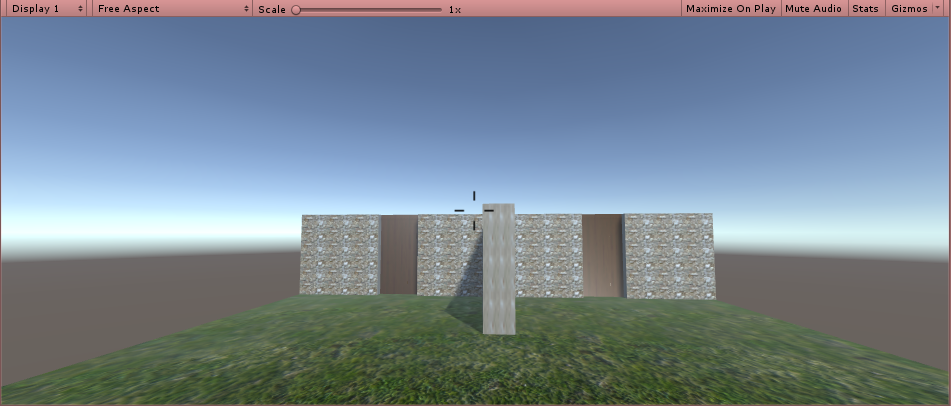
And this is the same scene with DWM, so below the surface of the water:

Another thing I implemented is that I put the crosshair in the center of the screen. It does not do anything yet, but the script understand that it's a special object it might want to reference and modify in code.
All in all, this was just a bit of tinyness that needs to be done, but does not take a lot of time. The script behind the things is not implemented yet. The crosshair will have its parts move to the center when pointing to something near and wide as it is in the picture, when pointing to something far away or not pointing to anything at all. the mask will be activated when the player is below the surface of the water, as explained in my earlier article on Drowning.
this week I'll finish the scene management that I was working on yesterday, as well as the implementation of the crosshair. For that, I'll be introducing some objects to interact and a script for the player to interact with the objects (starting with looking at then and gaining information)
Subscribe to:
Posts (Atom)